Documentation
UMIS general documentation
/ Student Dashboard Overview
📘 UMIS / Open Baraza Dashboard – Explanation
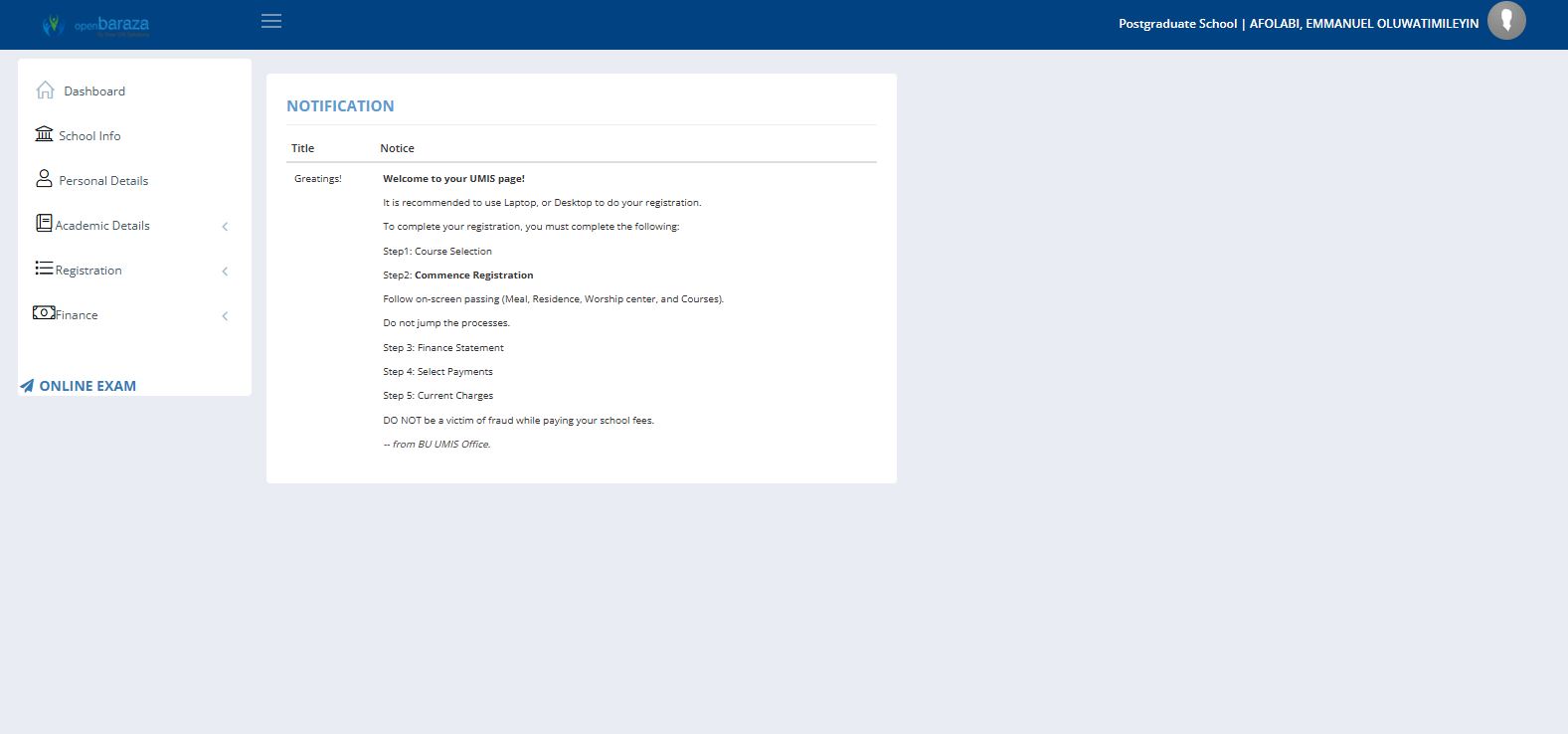
The screenshot shows the UMIS (University Management Information System) Dashboard powered by Open Baraza, specifically for a logged-in Postgraduate / Undergraduate School user.
The dashboard serves as the central control panel where users access academic, registration, finance, and personal information modules.
1. Top Navigation Bar
Located at the top of the screen (blue header).
Contains:
Open Baraza Logo – Identifies the system platform.
Menu Icon (☰) – Used to collapse or expand the sidebar menu.
User Information (Top Right) – Displays:
School/Unit (e.g., Undergraduate /Postgraduate School)
Logged-in user’s name
Profile Icon – For account-related actions (profile settings/logout).
📌 Purpose:
Confirms active session and provides account-level access.
2. Left Sidebar Navigation Panel
This is the main navigation menu that allows users to move between modules.
Menu Options Visible:
Menu Item | Function |
|---|---|
Dashboard | Main home page (current screen) |
School Info | View school listings and codes |
Personal Details | View or update personal information |
Academic Details | Access academic records and program information |
Registration | Course registration and enrolment processes |
Finance | Fee statements, payments, and charges |
Online Exam | Access online examination portal |
📌 Purpose:
Provides structured access to all major UMIS modules.