Documentation
UMIS general documentation
/ Semester Result
This documentation details the process for accessing and interpreting academic performance data within the Semester Result module. This feature allows students to view high-level semester summaries and drill down into specific course-by-course score breakdowns.
1. The Semester List View (High-Level Summary)
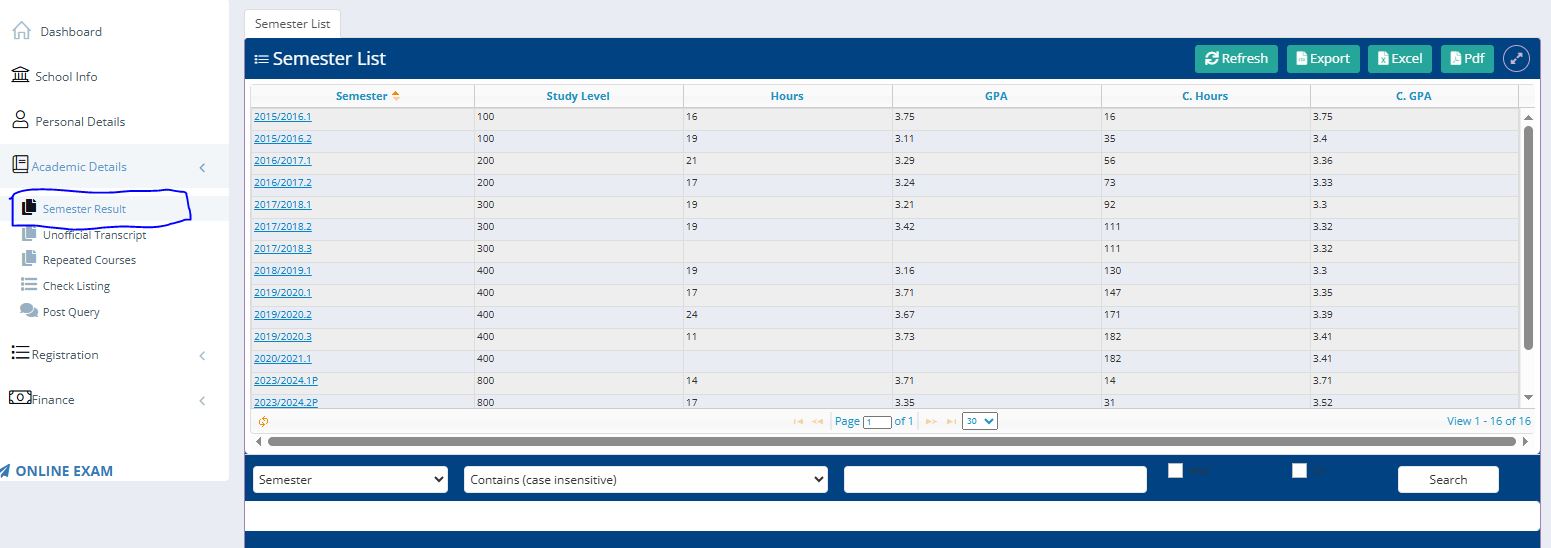
The initial landing page provides a chronological history of academic performance across all completed terms.
Navigation: Users access this by selecting "Academic Details" in the sidebar and clicking the "Semester Result" sub-menu.
Summary Table: This table displays critical cumulative data, including:
Semester: The specific academic session (e.g., 2019/2020.1).
GPA: The Grade Point Average achieved for that specific term.
C. GPA: The total Cumulative Grade Point Average up to that point in the student's career.
Hours/C. Hours: A record of credit hours earned in the semester versus total accumulated hours.
2. Navigating to the Score List (Drill-Down)
To view the specific grades for individual courses, the system uses a "clickable link" trigger.
The Action: Within the Semester List, click on the specific blue hyperlinked text under the "Semester" column (e.g., clicking on "2019/2020.1").
The Transition: Upon clicking, the system navigates from the broad
Semester Listtab to the specificSemester Course Listtab.
3. The Semester Course List (Detailed Breakdown)
Once navigated, the user is presented with a granular view of their performance for that specific selected term.
Data Columns
The Semester Course List table displays the following information for every registered course:
Course ID & Title: The formal identification code and name of the subject (e.g.,
PHYS101 - General Physics I).Score: The numerical mark achieved out of 100.
Credit: The weight or unit value assigned to the course.
Grade: The letter grade equivalent (e.g., A, B, C) based on the numerical score.
GP (Grade Points): The calculated points for that course (Credit $\times$ Grade Value).
