Documentation
UMIS general documentation
/ Select Meal Type
1. Meal Option Selection Process
Students who are eligible for on-campus dining must register their meal preferences for the semester to ensure their meal cards are properly activated.
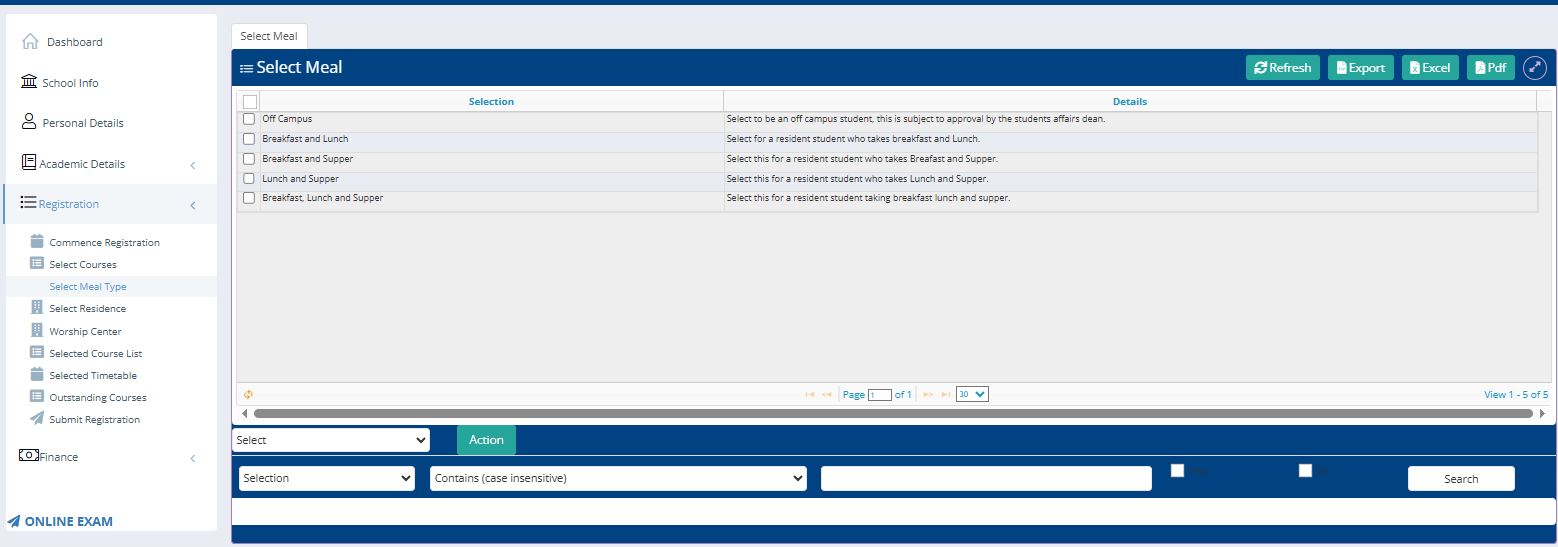
Access: Navigate to the Registration or Finance sub-menu in the sidebar.
Menu Entry: Select the Meal Option link to open the selection interface.
Choice of Meal: Use the dropdown menu to choose your preferred meal plan (e.g., 2-meal or 3-meal plan).
Finalizing Choice: After selecting the specific plan, click the Action button to commit your choice to the system.
2. Eligibility and Restrictions
The system automatically filters meal plan eligibility based on the student's residential status recorded in their Personal Details.
Important Notice for Off-Campus Students
Off-campus students are not entitled to a meal plan.
Functional Constraints:
Residential Status Check: If your Personal Details profile indicates that your Off Campus status is "Yes", the meal selection feature will be disabled.
Financial Impact: Meal fees are only calculated and added to the ledger for students living on campus who have selected a valid meal plan through the Action button.