Documentation
General Overview for the Experience Management System
/ Complaints
Complaints Module Overview
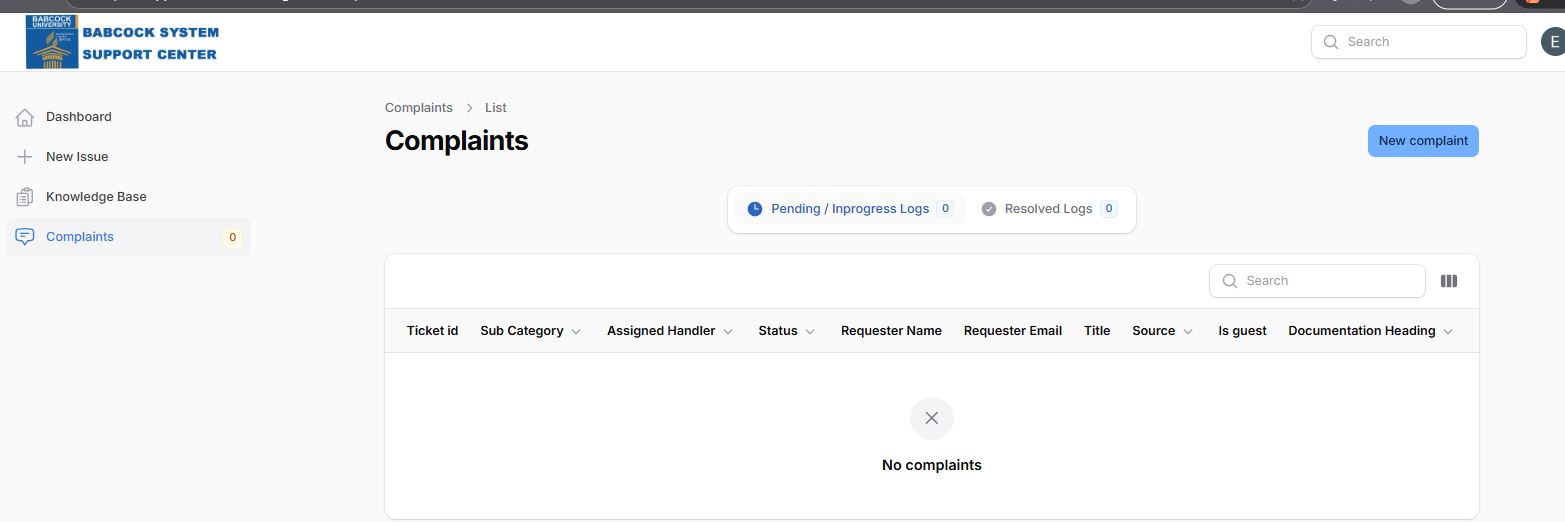
The Complaints segment is a data-rich environment designed for administrators and users to monitor the lifecycle of a support request. It provides a transparent view of how issues are being handled, by whom, and their current status.
1. Key Performance Indicators (KPIs)
At the top of the interface, the system provides high-level summaries to track efficiency:
Pending / In progress Logs: Displays the count of active complaints that require immediate attention.
Resolved Logs: Tracks the total number of issues successfully addressed and closed.
2. The Data Table (Tracking Matrix)
The central part of this module is the tracking table, which includes several critical data columns for granular analysis:
Ticket ID: A unique identifier for each submission to ensure traceable communication.
Subcategory: Further classifies the issue (e.g., Wireless, UMIS, or EAMS) to route it to the correct department.
Assigned Handler: Identifies the specific support staff member responsible for the ticket.
Status: Provides real-time updates on the progression of the complaint.
Requester Details: Includes the Name and Email of the person who submitted the issue for direct contact.
Is Guest: A flag to indicate if the requester is an external user or an authenticated university member.
Functional Analysis
Search and Filtering
The system includes a Search bar and a column visibility toggle (the three-bar icon). This allows managers to filter through hundreds of logs to find specific tickets by Title, Requester, or Handler, making it highly scalable for large organizations like a university.
The "New Complaint" Workflow
While the sidebar features a "New Issue" button, this module also includes a dedicated "New complaint" button in the top right corner. This allows users to initiate a request directly from the tracking view.
Current System State
Based on the provided interface:
Volume: There are currently 0 complaints logged.
User Experience: The interface uses a "No complaints" placeholder with a clear empty-state graphic, ensuring the user knows the system is functioning correctly even when no data is present.